You are using an out of date browser. It may not display this or other websites correctly.
You should upgrade or use an alternative browser.
You should upgrade or use an alternative browser.
You can now login to myfuturefund.ie as a participant
- Thread starter FDelahu
- Start date
See the section titled "Investment" and the links that it contains.

 myfuturefund.ie
And here:
myfuturefund.ie
And here:
 myfuturefund.ie
MyFutureFund
MyFutureFund is designed to help people increase their financial security in their retirement years. It is separate from the Irish State Pension, which remains the foundation of pensions in Ireland.
MyFutureFund
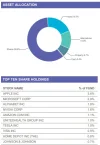
The KIDs don't list the holdings, you can Google the fund name or index to find out what each fund holds.you should be able to see where the top 10 positions are invested?
Last edited:
So what funds does the "high risk strategy " hold , i wasn't able to see that , is it amundi, blackrock multi asset or what and what proportions. Maybe its just me being dumb but I found everything very slow to navigate when I logged in, there didn't appear to be a huge amount of information in any case?
The nine funds (3 of each risk) are named in this KID.
The high-risk strategy is a mix between the three high-risk funds. It doesn't say the weightings so I would assume 33% each.
MyFutureFund works with three different Investment Managers to operate each investment strategy. This system is designed to diversify investments. Participants will not need to select an Investment Manager, as funds are spread among them automatically.
The document then lists the following in the "high risk" section.
- AMUNDI CCF - MULTI-ASSET GROWTH - AE with the 90%/10% allocation outlined above
- BlackRock CCF Growth Fund
- ILIM Growth Fund
The high-risk strategy is a mix between the three high-risk funds. It doesn't say the weightings so I would assume 33% each.
MyFutureFund works with three different Investment Managers to operate each investment strategy. This system is designed to diversify investments. Participants will not need to select an Investment Manager, as funds are spread among them automatically.
Last edited:
I'd be looking for specific fund information directly from NAERSA and getting my answers by email as opposed to over the phone so I'd probably contact
autoenrolment@welfare.ie
Or
customerservices@autoenrollment.ie
autoenrolment@welfare.ie
Or
customerservices@autoenrollment.ie
At what?Tried having a look
What's the link URL address?
At https://myfuturefund.ie/login when using myGovID as a participant...At what?
What's the link URL address?
I'd be looking for specific fund information directly from NAERSA and getting my answers by email as opposed to over the phone so I'd probably contact
autoenrolment@welfare.ie
Or
customerservices@autoenrollment.ie
I can't edit this now but that second email address has nothing whatsoever to do with AE and should probaly be removed.