They dont need data, thay can just take a screenshot and it will be in photos on the phoneFolks, is this a form of discrimination against people who don't have data, or even mobiles? Especially the elderly. This could form the basis of an Equal Status claim in the WRC, age being one of the "nine grounds". What about the people who use Cassidy Travel to make their arrangements and print their boarding pass?
You are using an out of date browser. It may not display this or other websites correctly.
You should upgrade or use an alternative browser.
You should upgrade or use an alternative browser.
Ryanair - electronic boarding passes only (starts November 2025)
- Thread starter arbitron
- Start date
what a pain...just completed a round trip to Funchal with Ryanair, with both legs taking place after the move to paperless boarding passes. The experience in Dublin and Funchal were very different. I was checking in a 20kg bag, which is where the fun started.
As usual, I checked for both legs on the Ryanair app, and it offers the chance to add the boarding pass to your phone's wallet which I find handy. On the day of travel, there's a shortcut on screen (Apple device) and it brings up the boarding pass QR and associated details. This worked fine in Dublin, where I showed the QR to the scanner on the self service kiosk for bag tag and drop, and things went as they usually do at tag and drop.
In Funchal today, there was a fair amount of chaos at the Ryanair checkin area, which had three free standing self service kiosk plinths. Each had no instructions, and a small 20cm square display that simply had a QR code showing. No scanner for your QR code on your phone.
A huge queue of puzzled passengers was generated, with plenty of confusion reigning. Eventually a hassled Ryanair employee arrived, and explained that everyone needed the "up to date version of the App". I checked, and there was no more up-to-date version available than the one I had, but when I finally got to the kiosk, the Ryanair rep looked at my app, and said I needed a new one, and briskly moved away.
As I was at the kiosk anyway, I fired up the camera app on the phone, and scanned the kiosk's QR code. It offered a link deep into the Ryanair website, which when I clicked on it started the bag tag and drop process. Unlike the kiosks in Dublin, all interaction was via the phone (asserting I'm not bringing prohibited items etc); in Dublin it's all via the onscreen interface. Other than an enigmatic QR code, there is no interface on the Funchal kiosks - just a printer for your tag. I was unable to tell if it jumped out of the Ryanair website and activated the Ryanair app, or simply used some functionality in the website itself. Tag and drop went as expected after that.
It was clear the poor employees were not trained up. They eventually had to open up a manual checkin desk for all the passengers who couldn't figure out the kiosks, as nobody involved in all this is an iPhone or Android phone tech support.
Wow Funchal, never been whats it like? Warm this time of year?
The Max has an additional emergency exit door which means that there is a section with 2 seats where the 800 would have 3.some people may have been moved from their original seats.
Wow Funchal, never been whats it like? Warm this time of year?
Absolutely stunning place. Wonderful walks, hikes, places to swim etc. Wonderful forested hills. The standard of civil infrastructure is amazing: motorways propped up across vertiginous ravines, and tunnels through mountains all over the place.
It's warm all year. We had daytime temperatures last week of 21C and nighttime around 16C (lowest it got to was probably 14C in the early hours). That said, it's got 100 microclimates due to the really steep hills and ravines. Up high (1.5km) in the forests when in cloud were about 10C in the daytime.
They dont need data, thay can just take a screenshot and it will be in photos on the phone
Ah, but for this checkin you definitely did need data. The luggage tag kiosk in Funchal has no scanner, so having your boarding pass QR code in your picture library is no use. You have to scan their QR code with your camera, and when it spots it's a website QR code, actually click on the link and follow it, which brings you into Ryanair's online tag printing service. Without data I don't think this is going to work, but I could be wrong.
Absolutely stunning place. Wonderful walks, hikes, places to swim etc. Wonderful forested hills. The standard of civil infrastructure is amazing: motorways propped up across vertiginous ravines, and tunnels through mountains all over the place.
It's warm all year. We had daytime temperatures last week of 21C and nighttime around 16C (lowest it got to was probably 14C in the early hours). That said, it's got 100 microclimates due to the really steep hills and ravines. Up high (1.5km) in the forests when in cloud were about 10C in the daytime.
 Added to the list then..
Say you would need data for that,, free airport wifi maybe? Not the safest tho..Ah, but for this checkin you definitely did need data. The luggage tag kiosk in Funchal has no scanner, so having your boarding pass QR code in your picture library is no use. You have to scan their QR code with your camera, and when it spots it's a website QR code, actually click on the link and follow it, which brings you into Ryanair's online tag printing service. Without data I don't think this is going to work, but I could be wrong.
DublinTexas
Key Post author
- Messages
- 426
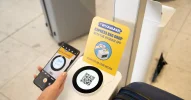
A lot of Airports still have the Ryanair Express Bag Drop units which require the Ryanair App, these are usualy free standing near the check-in area.
Those require scanning the shown barcode and then link into the Ryanair App. These require data connection to complete the process.
Either mobile data or Wifi.
These are clearly marked with "with the Ryanair app"!
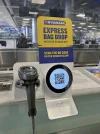
Some bigger airports have two in one near the actual bag on belt desk, it's the same but also with a scanner for the bag tag which do require data too to get the process started, but allow the handheld device to scan the bag tag than.
And then on major Ryanair bases like Dublin, they have even newer machines which require no data connection just for you to scan the QR code from the boarding pass:
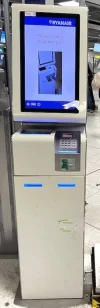
So, it really depends, if it says "via Ryanair app" you need data.
None of these pictures are mine - they were taken from the internet.
Those require scanning the shown barcode and then link into the Ryanair App. These require data connection to complete the process.
Either mobile data or Wifi.
These are clearly marked with "with the Ryanair app"!
Some bigger airports have two in one near the actual bag on belt desk, it's the same but also with a scanner for the bag tag which do require data too to get the process started, but allow the handheld device to scan the bag tag than.
And then on major Ryanair bases like Dublin, they have even newer machines which require no data connection just for you to scan the QR code from the boarding pass:
So, it really depends, if it says "via Ryanair app" you need data.
None of these pictures are mine - they were taken from the internet.
Removing some back and forth and replacing with a summary of how to safely use Airport Wifi if needed.
@Colin4444 raises the valid point that public wifi is not the safest. While this is certainly true, there are ways to protect yourself should you need to access the internet while travelling, and millions continue to use public wifi without issue.
The primary attack method on public wifi is where an attacker uses a device that broadcasts a wifi hotspot, usually named very similarly to the official public wifi service. The goal is to trick people in the vicinity into connecting to that service thinking they are in fact on the official service. The next step typically relies upon the user browsing the internet and visiting a site the attacker has prepared for. Banking and some social media sites are the prime targets. If the user browses to mybank.com, the attackers device will serve up a fake version of the mybank.com homepage they created earlier. That page will send the details the user enters to the attacker. It may pass them on to the legitimate site also so you don't suspect anything, or just give you an error message.
As more and more sites move to passwordless authentication now using your biometrics or pass keys on your device, the opportunities for these attacks decreases as the credentials attackers are after are no longer transmitted.
It's also possible that the attacker could try to use the wifi sign-in page to trick you into downloading malware. Mobile devices default to blocking app installs from outside of the stores, so definitely don't disable that protection if you are going to use public wifi, and pay close attention to any popups you receive.
The most significant measure you can put in place is to install and use a VPN, see some recommendations here. Using a VPN means the data leaving your device will be encrypted, so even if you are tricked into connecting to a fake hotspot, the attacker will not be able to access your data or see what site you're visiting.
If you can't install or use a VPN for whatever reason, do the bare minimum. Stick to using Apps rather than using a browser (mobile App communications to the internet services backing them are encrypted) and definitely don't visit any site that requires you to enter a user name and password.
Airports are getting better at protecting their users often monitoring for spurious hotspots. The high profile jailing of one perpetrator in Australia last year might put others off. Remote scams and phishing are much lower risk for the attackers than hanging around an airport.
@Colin4444 raises the valid point that public wifi is not the safest. While this is certainly true, there are ways to protect yourself should you need to access the internet while travelling, and millions continue to use public wifi without issue.
The primary attack method on public wifi is where an attacker uses a device that broadcasts a wifi hotspot, usually named very similarly to the official public wifi service. The goal is to trick people in the vicinity into connecting to that service thinking they are in fact on the official service. The next step typically relies upon the user browsing the internet and visiting a site the attacker has prepared for. Banking and some social media sites are the prime targets. If the user browses to mybank.com, the attackers device will serve up a fake version of the mybank.com homepage they created earlier. That page will send the details the user enters to the attacker. It may pass them on to the legitimate site also so you don't suspect anything, or just give you an error message.
As more and more sites move to passwordless authentication now using your biometrics or pass keys on your device, the opportunities for these attacks decreases as the credentials attackers are after are no longer transmitted.
It's also possible that the attacker could try to use the wifi sign-in page to trick you into downloading malware. Mobile devices default to blocking app installs from outside of the stores, so definitely don't disable that protection if you are going to use public wifi, and pay close attention to any popups you receive.
The most significant measure you can put in place is to install and use a VPN, see some recommendations here. Using a VPN means the data leaving your device will be encrypted, so even if you are tricked into connecting to a fake hotspot, the attacker will not be able to access your data or see what site you're visiting.
If you can't install or use a VPN for whatever reason, do the bare minimum. Stick to using Apps rather than using a browser (mobile App communications to the internet services backing them are encrypted) and definitely don't visit any site that requires you to enter a user name and password.
Airports are getting better at protecting their users often monitoring for spurious hotspots. The high profile jailing of one perpetrator in Australia last year might put others off. Remote scams and phishing are much lower risk for the attackers than hanging around an airport.
A lot of Airports still have the Ryanair Express Bag Drop units which require the Ryanair App, these are usualy free standing near the check-in area.
Aha! These things with the QR code on the screen were what I encountered, though they had no yellow tag on top urging you to scan - just a plain white plinth minus instructions. I scanned it with my camera on the grounds that that's about the only thing you can do with a QR code.
TrundleAlong
Registered User
- Messages
- 233
About 10 days ago I checked in to a coming Ryanair flight to the Netherlands. Downloaded the boarding passes to the Ryanair App and then added them to my Google wallet. All good.
Today I was just checking the times and dates of my flight only to discover that I could no longer log in to the Ryanair App and view my boarding passes. I got a message saying that I must upgrade my App via Google Play. It said on the current App that I could still view my boarding passes......except I couldn't. They flashed on my screen for a split second then disappeared.
I decided to check my Google wallet. The boarding pass for the flight over to Amsterdam was gone.....but the return flight was still there.
I asked my wife to check her Ryanair App on her phone. She has both flights over and back to Amsterdam on her phone but when she checked her Google wallet she can't get either of her boarding passes despite adding both to her Google wallet about 10 days ago.
Anybody else having problems like this?
Today I was just checking the times and dates of my flight only to discover that I could no longer log in to the Ryanair App and view my boarding passes. I got a message saying that I must upgrade my App via Google Play. It said on the current App that I could still view my boarding passes......except I couldn't. They flashed on my screen for a split second then disappeared.
I decided to check my Google wallet. The boarding pass for the flight over to Amsterdam was gone.....but the return flight was still there.
I asked my wife to check her Ryanair App on her phone. She has both flights over and back to Amsterdam on her phone but when she checked her Google wallet she can't get either of her boarding passes despite adding both to her Google wallet about 10 days ago.
Anybody else having problems like this?
blanketyblank
Registered User
- Messages
- 192
I am travelling shortly for the first time using the boarding pass on the Ryanair app - normally I'd have printed multiple copies. To say I'm feeling nervous is an understatement! I've done the check in and sent a screenshot to Whats app of the Boarding pass. Is there anything else I can do?
I'm so nervous I'd break my phone / have it stolen for the first time ever!
I'm so nervous I'd break my phone / have it stolen for the first time ever!
Ryanair have you listed in their systems too, so in the hopefully very unlikely event that you loose your phone, pop up to their check-in counter and they will assist you.I'm so nervous I'd break my phone / have it stolen for the first time ever!
You could print a copy of the QR codes. Open enlarge them via the RyanAir app or Google or other wallet, screenshot and print.Is there anything else I can do?
If you're travelling with others, share with someone else. Protects against any phone having an issue.
TrundleAlong
Registered User
- Messages
- 233
Both myself and my wife keep a copy of each other's boarding pass on each of our phones. Both in the Ryanair App and in our Google wallet.If you're travelling with others, share with someone else. Protects against any phone having an issue.
We have used the App about 6 times and nil problems other than the problem that I posted about above.