I believe this is a feature exclusively for Pixel phones, but I found it very useful.
It screens your call before you pick up the call.
Here's how to enable it:
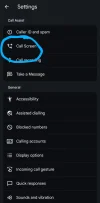
1) Open the Phone App and click on Settings, then select "Call Screen"
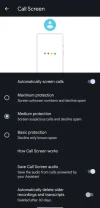
2) Select the protection level
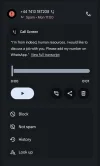
If a call is flagged as suspicious, it will automatically use Google Assistant to screen the call, this is an example of a call:
Hopefully they'll roll out this feature to other phone models. It saved me already 10 calls from possible scammers..
It screens your call before you pick up the call.
Here's how to enable it:
1) Open the Phone App and click on Settings, then select "Call Screen"
2) Select the protection level
If a call is flagged as suspicious, it will automatically use Google Assistant to screen the call, this is an example of a call:
Hopefully they'll roll out this feature to other phone models. It saved me already 10 calls from possible scammers..